A strength practice ledger · v1.0

A strength ledger for frequent practice.

Practice one movement often, in sets well short of failure. QualiReps records your max, computes the dose for each set, shows when the next set is due, and tracks your level along a path of harder variations.

Lifetime license — 9,99 € · one purchase, no subscription
Paths Push-up · Pull-up · Squat · Kettlebell press
Platform Web app · Android, iOS, desktop
Pricing Free on one exercise · 9,99 € once
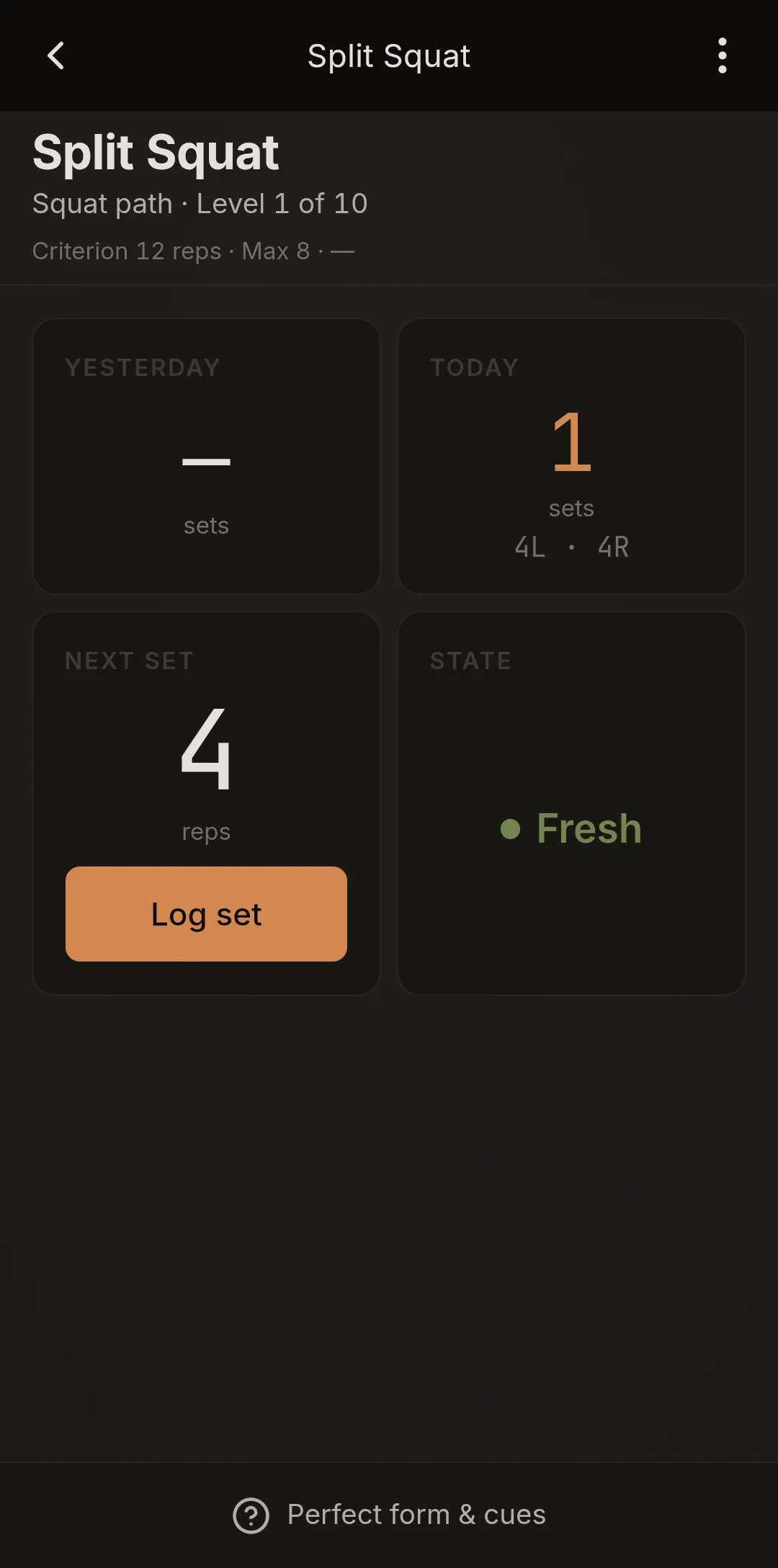
Exercise screen for Split Squat, Squat path Level 1 of 10: state Fresh, next set 4 reps
01 / How it works

Max, dose, rest, level.

What QualiReps keeps for each exercise, and what it shows you.

QualiReps is built around one practice: a single movement, done in several short sets spread through the day, each set stopped well short of failure. The practice is known as Greasing the Groove; on screen, the app calls it GtG. QualiReps keeps the ledger for it, exercise by exercise.

01
MaxYour max in clean reps or clean seconds: performed now, already performed, or estimated. It changes only when you update it.
02
DoseNEXT SET shows half your max, rounded down, capped at 5 reps and never below 1. Timed holds get half the max, with no cap. One-sided exercises are dosed from the weaker side.
03
RestAfter a set, the exercise is Resting, with a countdown, for at least 5 minutes — longer after a set close to failure. Its Log set button stays disabled until it is Fresh again.
04
LevelEach level has a passage criterion. When your max reaches it, the exercise screen says so and offers Change level. Moving is never automatic.

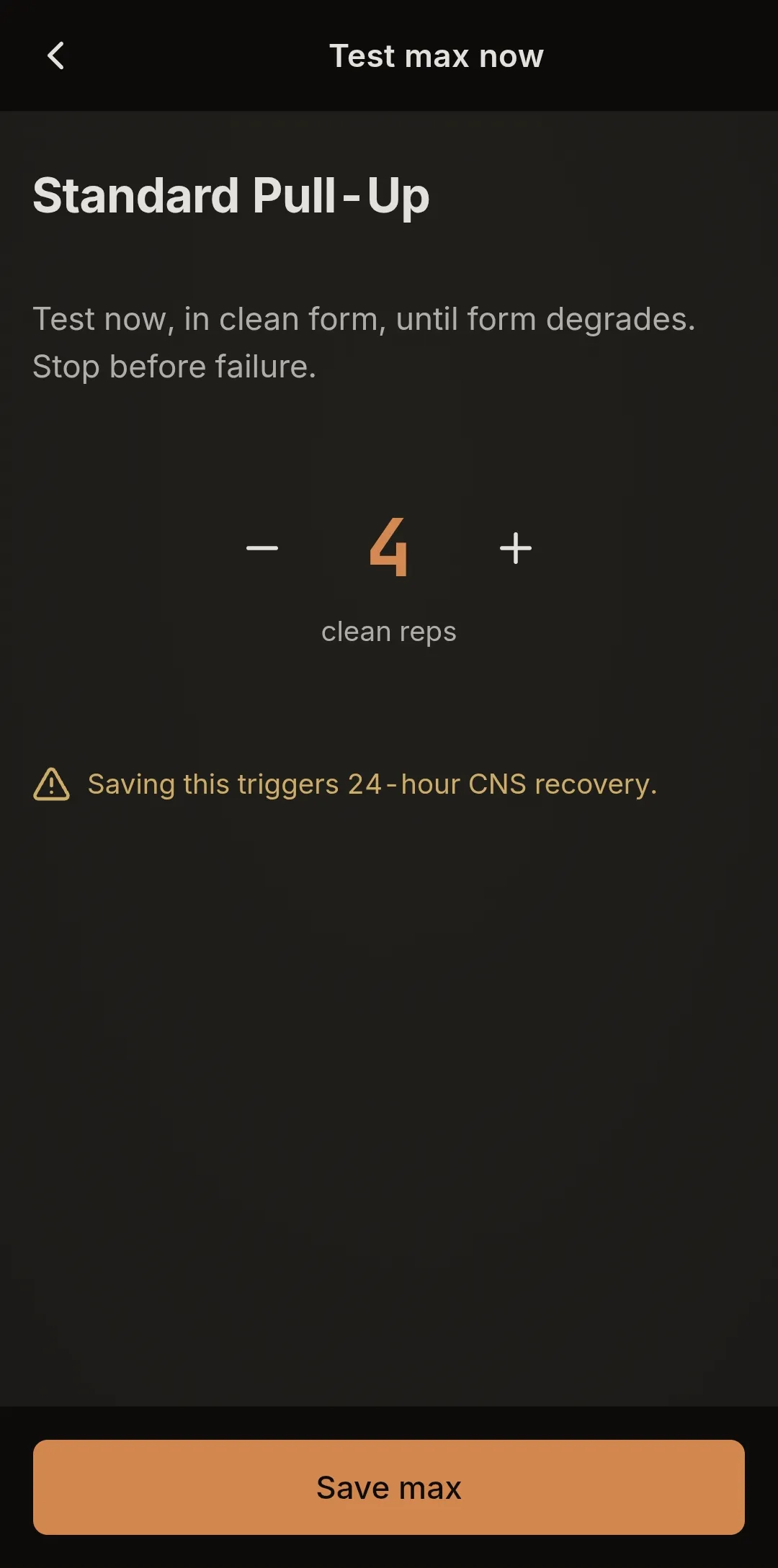
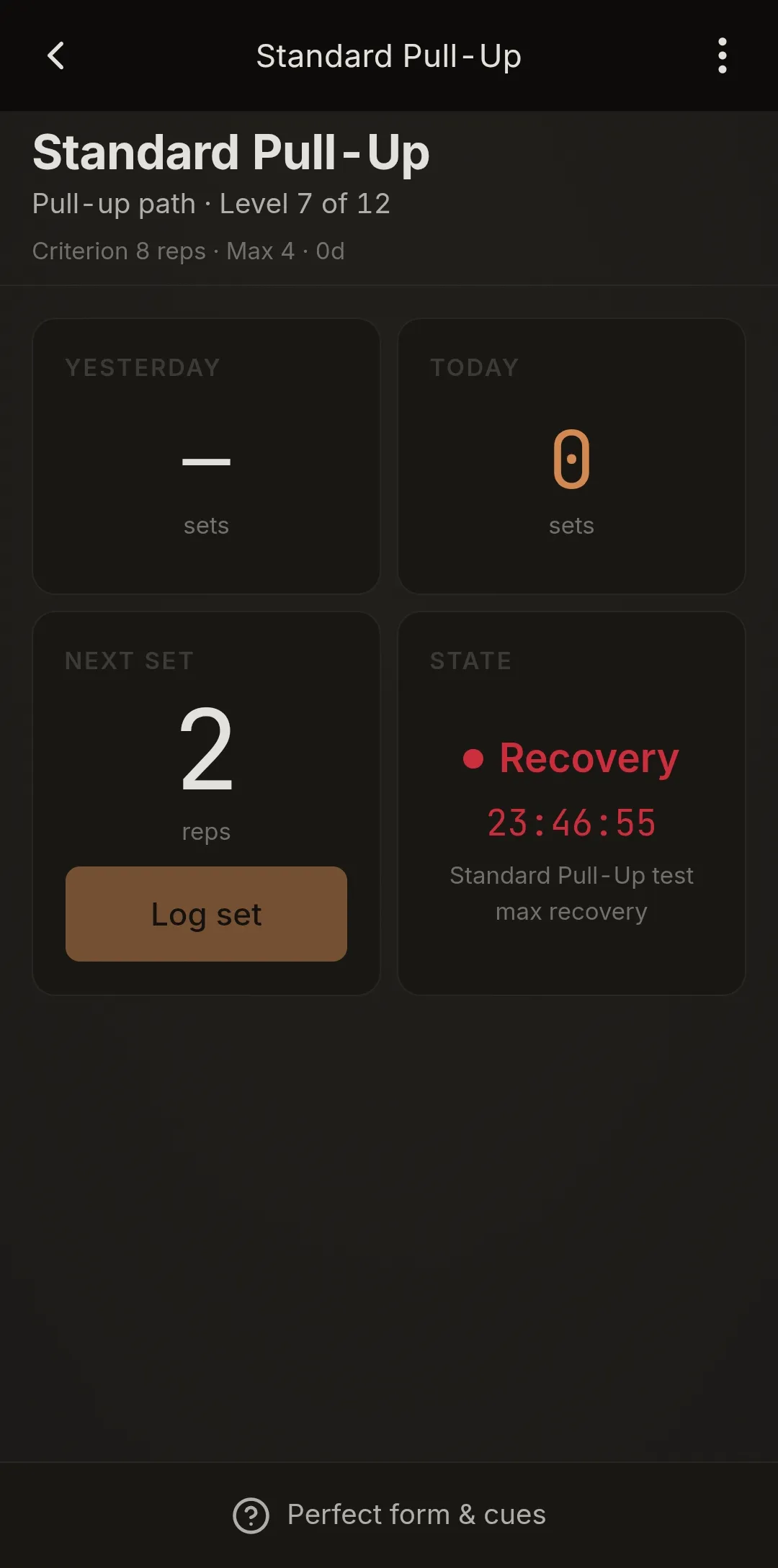
A measured max test puts that exercise into Recovery for 24 hours; an estimated max does not, and your other exercises are unaffected. On the days you switch off under Settings → Active days (Sunday, by default), every exercise shows Rest day and its set button is disabled.

02 / The paths

Four paths of harder variations.

Each path is a ladder of levels; every level below the last has a passage criterion. The push-up, pull-up and squat paths make each level harder through leverage. The kettlebell press path keeps one movement, a one-arm clean and press, and makes it harder by weight.

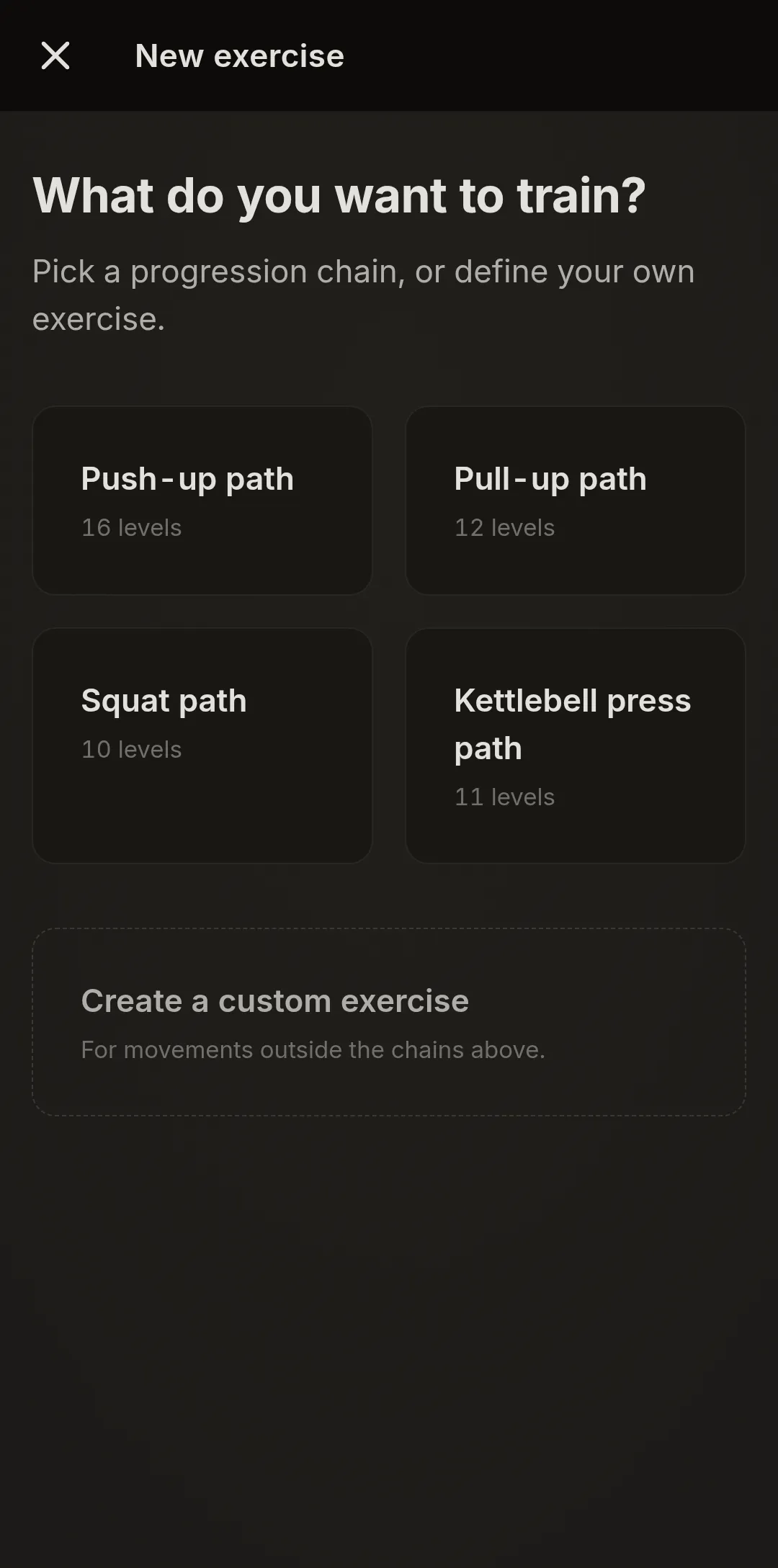
Push-up path: 16 levels, ending at One-Arm Push-Up — Narrow Stance. Pull-up path: 12 levels, ending at One-Arm Pull-Up. Squat path: 10 levels, ending at Free Pistol. Kettlebell press path: 11 levels, from 8 kg to 48 kg in 4 kg steps. You choose the level you start at, and you can keep one active exercise per path. For a movement outside the paths, a paid license adds custom exercises.

03 / Who it's for

Who it's for.

You want to get better at one movement — a pull-up, a pistol, a one-arm push-up — and you'd rather practice it often than train it hard twice a week. You can fit a thirty-second set into your day, several times over.

And you want a record of what you did rather than a coach telling you what to do: QualiReps keeps the ledger, the decisions stay yours. The paths run to the One-Arm Push-Up — Narrow Stance, the One-Arm Pull-Up and the Free Pistol — far ends, reached level by level, or not. The record is useful either way.

04 / Free and paid

Free on one exercise.

The free version runs the whole ledger, on one exercise.

You pick one exercise, on any path, at any level. It stays at that level, and everything else works on it: max testing, the dose, the four states, set logging, history, the form guides, CSV export and backup.

You can change that choice once. After that it is fixed: archiving or deleting the exercise does not open a new choice, and neither does Reset all data. When you reach the passage criterion, the app still shows it; changing level is part of the paid version.

Free

  • One exercise, on any path and at any level, fixed at that level
  • One change of that choice
  • Max testing, dose, the four states, set logging
  • History, CSV export, backup
  • All 39 form guides

Paid · 9,99 € once

  • Change level, up or down, at any time
  • Up to three active exercises, at most one per path
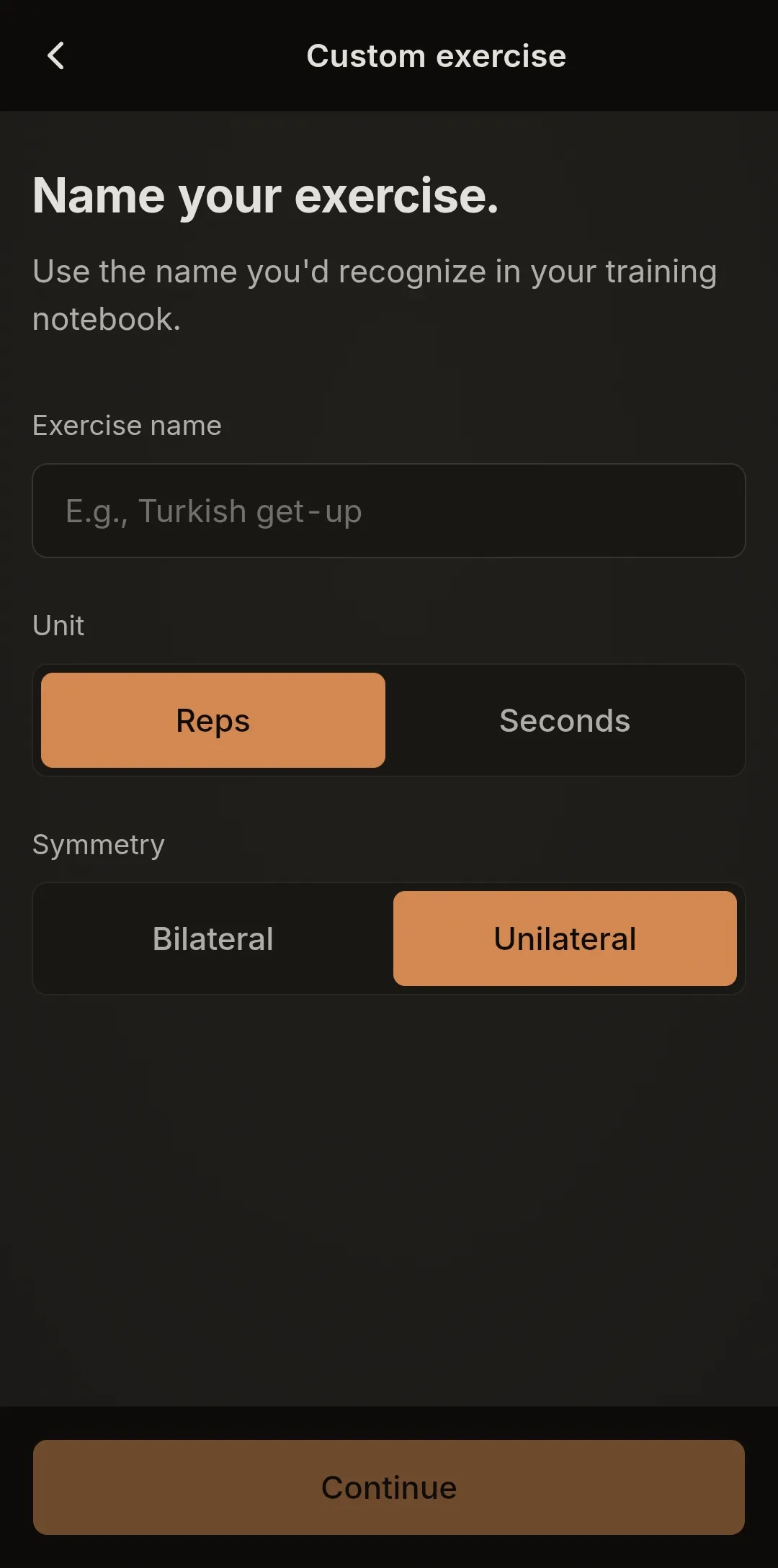
  • Custom exercises, for movements outside the paths
  • One license key for your other devices

One purchase, lifetime license. No subscription.

05 / Screenshots

See it.

The paths, the max test, the Recovery state that follows it, and a custom exercise.

  • New exercise screen: Push-up path 16 levels, Pull-up path 12 levels, Squat path 10 levels, Kettlebell press path 11 levels, and Create a custom exercise
    Choose a path
  • Test max now screen: a clean reps stepper and the line “Saving this triggers 24-hour CNS recovery.”
    Test your max
  • Standard Pull-Up, Pull-up path Level 7 of 12: state Recovery, with a 24-hour countdown
    Recovery after a max test
  • Custom exercise form: exercise name, unit (reps or seconds), symmetry (bilateral or unilateral)
    A custom exercise
06 / Get QualiReps

Install.

Install free from your browser. Android, desktop and iOS run the same web app; after the first load it works offline, except for purchasing.

AndroidChrome · install from browser

Android

  1. Open app.qualireps.app in Chrome.
  2. Tap the menu (⋮), then "Install app" (or "Add to Home Screen").
  3. It installs like a native app and runs fully offline.
Open app.qualireps.app
DesktopChrome · Edge

Desktop

  1. Open app.qualireps.app in Chrome or Edge.
  2. Click the install icon in the address bar.
  3. It runs offline as a standalone app.
Open app.qualireps.app
iOSSafari

iOS

  1. Open app.qualireps.app in Safari. (If the page opened inside another app — Reddit, Instagram, email — tap ⋯ or the Safari icon, then "Open in Safari".)
  2. Tap the Share button — the square with an upward arrow. (At the bottom of the screen on iPhone, at the top on iPad.)
  3. Scroll down and tap "Add to Home Screen".
  4. Tap "Add" in the top-right corner.

QualiReps now lives on your home screen — opens full-screen, no browser bar.

Open app.qualireps.app
07 / Perfect form guides

Open knowledge.

39 perfect form guides: one for each of the 38 bodyweight levels, and one shared by all 11 kettlebell levels. They are free to read, here and in the app.

08 / Frequently asked

Questions.

Can I try QualiReps before paying?
Yes. The free version runs on one exercise, on any path and at any level, and that exercise stays at its level. Max testing, the dose, the four states, set logging, history, the form guides, CSV export and backup all work on it. You can change your choice of exercise once. Changing level, adding exercises and creating custom exercises are paid.
What does the purchase add?
Three things: changing level, up or down, on any exercise; up to three active exercises at a time, at most one per path; and custom exercises, for movements outside the paths. The limit of three active exercises applies to paid users too. The price is 9,99 €, paid once: a lifetime license, no subscription.
How do I pay, and how do I use my other devices?
You pay once through Paddle, either from inside the app or on the web. The license key is emailed to you, and in the app it is shown under Settings → License. On another device, tap “I have a license” or “Enter key →” and type the key. It is checked on the device; there is no account.
How do I install QualiReps?
From the browser; there is no app store. On Android and desktop, open app.qualireps.app in Chrome (or Edge on desktop) and use its install button. On iPhone and iPad, open app.qualireps.app in Safari, tap Share, then “Add to Home Screen”.
Does it work offline?
Yes, after the first load. The app’s files are cached on your device, and your data is stored there too. Purchasing is the exception: it needs a connection.
What data leaves my device?
In normal use, none. Your exercises, sets and maxes stay in your browser’s storage on the device. The app has no account, no analytics, no trackers and no third-party fonts. Buying is the one exception: the app loads Paddle’s checkout, where you type your email; our server then receives the Paddle transaction id, fetches your email from Paddle and sends you the license key through an email provider, Resend. This website is different from the app: it counts visits with GoatCounter, and some pages load Paddle’s script to show the price in your currency. See the privacy policy.
What if I lose or replace my phone?
Your data lives only on the device, so keep a backup. Settings → Data → “Export backup” writes a JSON file with everything, including your license key; the file is not encrypted, so keep it somewhere safe. “Import backup” on another device replaces that device’s data with the file’s. The app reminds you after 30 days without a backup.
What is Greasing the Groove?
A way of practicing one movement: several short sets through the day, each stopped well short of failure, with rest between sets. QualiReps implements it with the mechanics on this page: the dose comes from your max, the next set waits for the rest to end, and a level change waits for you, once the passage criterion is reached.